$ sudo mdadm --detail /dev/md0
$ cat /proc/mdstat$ sudo mdadm --detail /dev/mdX
$ cat /proc/mdstat
lvdisplay -v /dev/vg00/lvol2pvdisplay /dev/ssd3
Q How to show the usage of process that are consuming network bandwidth?
A
a) You can use the nethogs utility.
ex nethogs -a
or
nethogs -i ens33 or whatever interface you want to get usage stats from.
b) you can use vnstat utility
vnstat -i ens33
vnstati -s -i ens33 -o vnstatreport.png
Q How to know what ports a server is listening to?
A lsof -i -P -n | grep LISTEN
Q How to see what active connections from the Internet?
A netstat –listen
Q How to use iptables
a) Display Your Firewall status
iptables -L -n -v
b) Display firewall with line numbers
iptables -n -L -v –line-numbers
c) Display INPUT or OUTPUT chain rules
iptables -L INPUT -n -v iptables -L OUTPUT -n -v
d) Stop / Start / Restart the Firewall
service iptables stop/start/restart
e) Drop all incoming / forwarded packets, but allow outgoing traffic
iptables -P INPUT DROP iptables -P FORWARD DROP iptables -P OUTPUT ACCEPT iptables -A INPUT -m state –state NEW,ESTABLISHED -j ACCEPT iptables -L -v -n
Security Linux System Administration (SF)_AR_V2.0 Linux System Administration (SF)_LG_Supplement_V2.1 6 Steps to Assess your Network Security Follow these six steps to assess the vulnerability of your network: Step 1: Identify and understand the way your business is organized and operates- Most businesses rely on collaboration between representatives from their internal business units, legal teams, and finance departments to coordinate with IT professionals regarding their exact network needs. Consider issues such as client or customer privacy, regulatory compliance, business processes, and competitive positioning within your industry.
- Identify which of these are sensitive and what information is at risk in the event of a privacy breach.
- This is especially important if there is cloud-based access to private data or access across multiple platforms, including smartphones and tablets.
- These servers may not be protected and may allow access to sensitive information without you knowing it.
- Your network protection may already include specific policies, firewalls, virus detection, VPNs, disaster recovery, and encryption. It’s important to understand the capabilities of your current security measures in order to properly address any vulnerabilities.
- The results of this scan will give you confirmation of your network’s security. Should a virus or vulnerable area be identified, you will need to develop a network security strategy, possibly with the help of an MSP.
- Step 1: Identify hazards. Examples of common hazards which can lead to musculoskeletal disorders (MSD) …
- Step 2: Assess the risk. …
- Step 3: Control the risk. …
- Step 4: Review risk control.
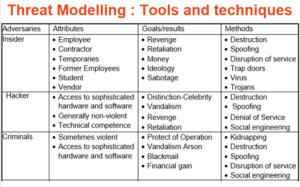
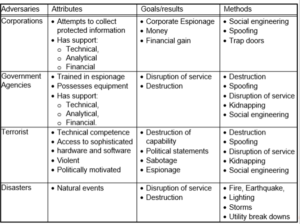 Threat Modeling: 12 Available Methods
STRIDE Threat Modeling (Developer Focused)
STRIDE stands for Spoofing Tampering Repudiation Information Message Disclosure Denial of Service and Elevation of Privilege. Microsoft’s threat modeling methodology – commonly referred to as STRIDE – aligns with their Trustworthy Computing directive of January 2002.[4] The primary focus of that directive is to help ensure that Microsoft’s Windows software developers think about security during the design phase.
P.A.S.T.A. Threat Modeling (Attacker Focused)
The Process for Attack Simulation and Threat Analysis is a relatively new application threat modeling methodology.[3] PASTA threat modeling provides a seven-step process for risk analysis which is platform insensitive. The goal of the PASTA methodology is to align business objectives with technical requirements while taking into account business impact analysis and compliance requirements. The output provides threat management, enumeration, and scoring.
The Visual, Agile, and Simple Threat modeling (VAST) methodology was conceived after reviewing the shortcomings and implementation challenges inherent in the other threat modeling methodologies. The founding principle is that, in order to be effective, threat modeling must scale across the infrastructure and entire DevOps portfolio, integrate seamlessly into an Agile environment and provide actionable, accurate, and consistent outputs for developers, security teams, and senior executives alike.
Trike Threat Modeling (Acceptable Risk Focused)
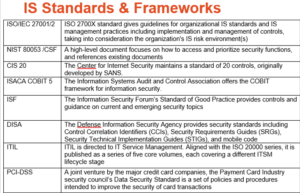
IS Standard and Frameworks
Threat Modeling: 12 Available Methods
STRIDE Threat Modeling (Developer Focused)
STRIDE stands for Spoofing Tampering Repudiation Information Message Disclosure Denial of Service and Elevation of Privilege. Microsoft’s threat modeling methodology – commonly referred to as STRIDE – aligns with their Trustworthy Computing directive of January 2002.[4] The primary focus of that directive is to help ensure that Microsoft’s Windows software developers think about security during the design phase.
P.A.S.T.A. Threat Modeling (Attacker Focused)
The Process for Attack Simulation and Threat Analysis is a relatively new application threat modeling methodology.[3] PASTA threat modeling provides a seven-step process for risk analysis which is platform insensitive. The goal of the PASTA methodology is to align business objectives with technical requirements while taking into account business impact analysis and compliance requirements. The output provides threat management, enumeration, and scoring.
The Visual, Agile, and Simple Threat modeling (VAST) methodology was conceived after reviewing the shortcomings and implementation challenges inherent in the other threat modeling methodologies. The founding principle is that, in order to be effective, threat modeling must scale across the infrastructure and entire DevOps portfolio, integrate seamlessly into an Agile environment and provide actionable, accurate, and consistent outputs for developers, security teams, and senior executives alike.
Trike Threat Modeling (Acceptable Risk Focused)
IS Standard and Frameworks
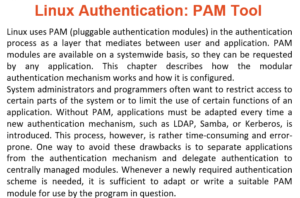
 Linux Authentication: PAM Tool
 Asset Threat Risk Vulnerability
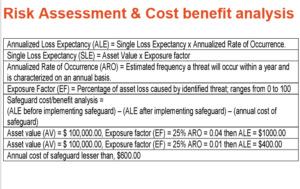
 Risk Assessment and Cost Benefiyt Analysis
 Q
What are some Risk Identification tools and techniques?
A
Risk Identification tools and techniques
Q
What is CIA Triad?
A
What is CIA Triad ?
Q
Q
What are some Risk Identification tools and techniques?
A
Risk Identification tools and techniques
Q
What is CIA Triad?
A
What is CIA Triad ?
Q
Name some Linux Security Tips and Checklist
A
